Energy Dashboard#
Current Consumption#
EDF does not provide live/current consumption data
Unlike Octopus Energy (which offers the Home Mini), EDF Energy's API has no live or current-day meter feed. This integration therefore does not create any current_accumulative_consumption, current_consumption, current_demand or current_accumulative_cost entities, and it never will unless EDF start serving that data. If you are looking for those sensors because you followed an older version of this guide, they don't exist — see the options below instead.
You can still record today's consumption in the Energy dashboard, but you need an independent live source in Home Assistant to do it. The two practical routes are a Hildebrand Bright / Glow feed (recommended, since it reads the same smart meter) or a CT clamp / inverter sensor.
Recommended: Hildebrand Bright (Glow) live data#
If you have a Hildebrand Bright app account (also branded "Glow"), the free Hildebrand Glow (DCC) HACS integration pulls near-real-time readings straight from your smart meter over the DCC network — no extra hardware needed. This is the closest equivalent to Octopus's live feed and works with the same meter EDF bills you from.
Once that integration is set up you'll get a glow_smart_meter_<DEVICE_ID>_... device with these useful entities:
| Entity | What it gives you |
|---|---|
sensor...._smart_meter_electricity_import |
Cumulative electricity import (kWh) — a total_increasing sensor, ideal for the Energy dashboard |
sensor...._smart_meter_electricity_power |
Instantaneous demand in watts — live "what's my house using right now" |
sensor...._smart_meter_electricity_import_today |
Import so far today (kWh) |
sensor...._smart_meter_electricity_export |
Cumulative export (kWh), if you export |
sensor...._smart_meter_gas_import |
Cumulative gas import (kWh) |
sensor...._smart_meter_gas_import_vol |
Cumulative gas volume (m³) |
sensor...._smart_meter_gas_import_today |
Gas used so far today (kWh) |
To add it to the Energy dashboard:
- Go to your energy dashboard configuration
- Click
Add ConsumptionunderElectricity grid - For
Consumed energychoose the cumulative import sensor, e.g.sensor.glow_smart_meter_<DEVICE_ID>_smart_meter_electricity_import - Choose
Use an entity with current priceand picksensor.edf_energy_electricity_{{METER_SERIAL_NUMBER}}_{{MPAN_NUMBER}}_current_rateso cost is calculated against your EDF tariff - For gas, click
Add Gas Sourceand usesensor.glow_smart_meter_<DEVICE_ID>_smart_meter_gas_import(kWh) or..._smart_meter_gas_import_vol(m³) the same way
Note
Because these readings come from Hildebrand rather than from EDF directly, they won't include the standing charge and there will be a small measurement difference versus what EDF eventually bill. In practice the difference is usually tiny.
Alternative: CT clamp or inverter grid-import sensor#
If you don't use Bright/Glow, any other near-live grid-import source works too — a CT clamp such as a Shelly EM on the incoming supply cable, or a grid-import sensor from your solar/battery inverter.
- Create a utility meter that resets daily to store the consumption in, e.g.
Grid Import Today. A utility meter is a Home Assistant helper that totals an ever-increasing sensor over a cycle; add one under Settings > Devices & services > Helpers. - Point the utility meter at your grid-import sensor. e.g. for a Hildebrand Glow it could be
sensor.glow_smart_meter_<DEVICE_ID>_smart_meter_electricity_import; a Shelly EM will besensor.<EM channel name>_energy_total; for a GivEnergy inverter using GivTCP it will besensor.givtcp_XXyywwXnnn_import_energy_today_kwh - Add the utility meter to the Energy dashboard as above: for
consumed energyuse the utility meter (e.g.sensor.grid_import_today), and for cost chooseUse an entity with current pricewithsensor.edf_energy_electricity_{{METER_SERIAL_NUMBER}}_{{MPAN_NUMBER}}_current_rate
Previous Day Consumption#
If none of the methods above for feeding Current Day Consumption information into the Energy dashboard are suitable, you can add previous consumption information to the dashboard, using information retrieved via the EDF Energy API. Note that the consumption information is only available on the following day so "today's" Energy dashboard will show zero values, but "yesterday's", "day before", etc will show the correct consumption for each day.
Warning
Beware: Whilst you can add the previous consumption sensors directly to the Energy dashboard, they will be associated with the wrong day. This is because the Energy dashboard uses the timestamp of when the sensor updates to determine which day the data should belong to.
Instead, you must use external statistics that are exported by the previous consumption sensors, which are broken down into hourly chunks.
Info
It can take up to 24 hours for the external statistics to appear.
Note
I'm still investigating having hourly breakdowns imported on the entity themselves rather than as external statistics, but currently in doing so it's still including the spikes on the day of retrieval. I've opened a forum post but awaiting answers.
For Electricity#
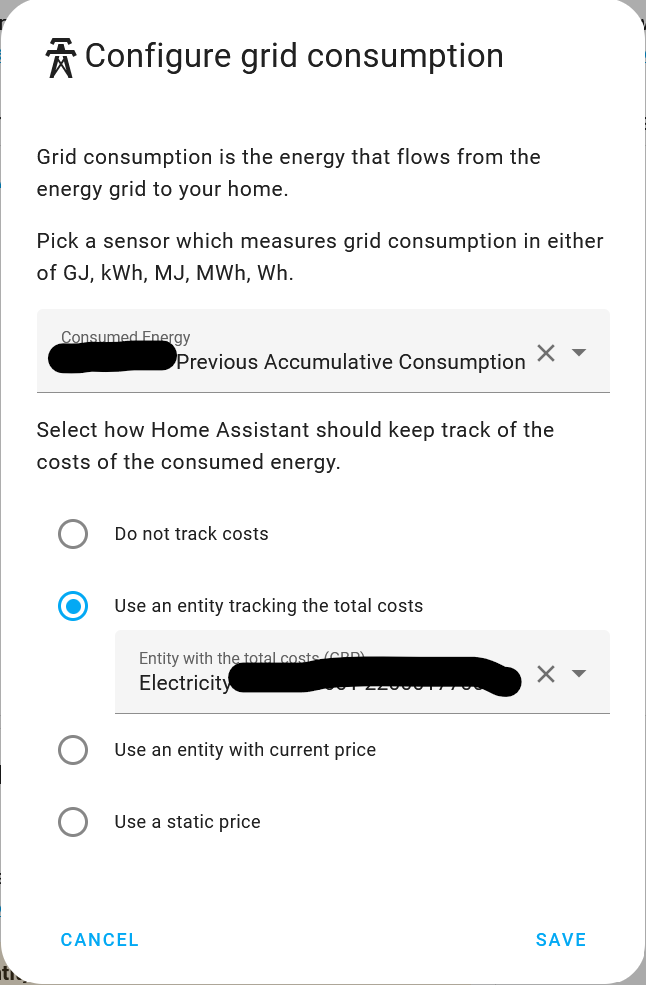
- Go to your energy dashboard configuration
- Click
Add ConsumptionunderElectricity Grid - For
consumed energyyou want one of the following: edf_energy:electricity_{{METER_SERIAL_NUMBER}}_{{MPAN_NUMBER}}_previous_accumulative_consumption- The total consumption reported by the meter for the previous day. Please note the different name to the standard entity, do NOT choose sensor.electricity_{{METER}}_{{MPAN}}_previous_accumulative_consumption.edf_energy:electricity_{{METER_SERIAL_NUMBER}}_{{MPAN_NUMBER}}_previous_accumulative_consumption_peak- The total consumption reported by the meter during peak hours for the previous day. This will only be populated if you're on a tariff with two available rates and is disabled by default. Please note the different name to the standard entity, do NOT choose sensor.electricity_{{METER}}_{{MPAN}}_previous_accumulative_consumption_peak.edf_energy:electricity_{{METER_SERIAL_NUMBER}}_{{MPAN_NUMBER}}_previous_accumulative_consumption_off_peak- The total consumption reported by the meter during off-peak hours for the previous day. This will only be populated if you're on a tariff with two available rates and is disabled by default. Please note the different name to the standard entity, do NOT choose sensor.electricity_{{METER}}_{{MPAN}}_previous_accumulative_consumption_off_peak.- For
Use an entity tracking the total costsoption you want one of the following: edf_energy:electricity_{{METER_SERIAL_NUMBER}}_{{MPAN_NUMBER}}_previous_accumulative_cost- The total cost for the previous day. Please note the different name to the standard entity, do NOT choose sensor.edf_energy_electricity_{{METER_SERIAL_NUMBER}}_{{MPAN_NUMBER}}_previous_accumulative_cost.edf_energy:electricity_{{METER_SERIAL_NUMBER}}_{{MPAN_NUMBER}}_previous_accumulative_cost_peak- The total cost for the previous day that applied during peak hours. This will only be populated if you're on a tariff with two available rates and is disabled by default. Please note the different name to the standard entity, do NOT choose sensor.edf_energy_electricity_{{METER_SERIAL_NUMBER}}_{{MPAN_NUMBER}}_previous_accumulative_cost_peak.edf_energy:electricity_{{METER_SERIAL_NUMBER}}_{{MPAN_NUMBER}}_previous_accumulative_cost_off_peak- The total cost for the previous day that applied during off-peak hours. This will only be populated if you're on a tariff with two available rates and is disabled by default. Please note the different name to the standard entity, do NOT choose sensor.edf_energy_electricity_{{METER_SERIAL_NUMBER}}_{{MPAN_NUMBER}}_previous_accumulative_cost_off_peak.
For Gas#
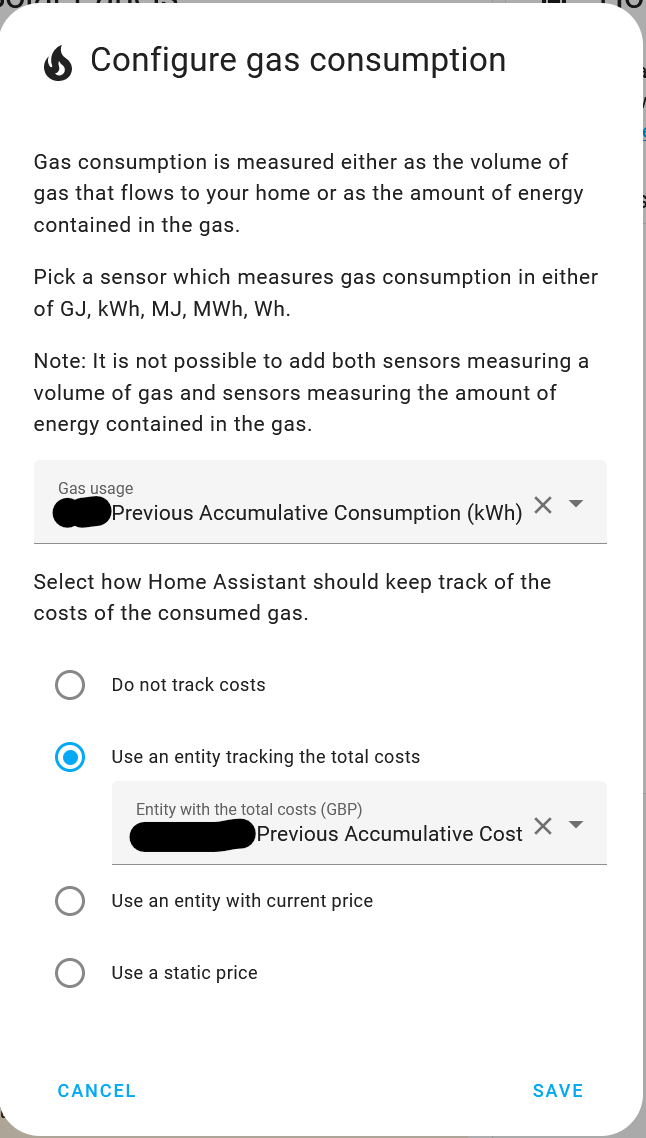
- Go to your energy dashboard configuration
- Click
Add Gas SourceunderGas Consumption - For
consumed energyyou want one of the following edf_energy:gas_{{METER_SERIAL_NUMBER}}_{{MPRN_NUMBER}}_previous_accumulative_consumption- The total consumption reported by the meter for the previous day in m3. If your meter reports in m3, then this will be an accurate value reported by EDF Energy, otherwise it will be a calculated/estimated value. Please note the different name to the standard entity, do NOT choose sensor.edf_energy_gas_{{METER_SERIAL_NUMBER}}_{{MPRN_NUMBER}}_previous_accumulative_consumption.edf_energy:gas_{{METER_SERIAL_NUMBER}}_{{MPRN_NUMBER}}_previous_accumulative_consumption_kwh- The total consumption reported by the meter for the previous day in kwh. If your meter reports in kwh, then this will be an accurate value reported by EDF Energy, otherwise it will be a calculated/estimated value. Please note the different name to the standard entity, do NOT choose sensor.edf_energy_gas_{{METER_SERIAL_NUMBER}}_{{MPRN_NUMBER}}_previous_accumulative_consumption_kwh.- For
Use an entity tracking the total costsoption you want the following edf_energy:gas_{{METER_SERIAL_NUMBER}}_{{MPRN_NUMBER}}_previous_accumulative_cost- The total cost for the previous day. Please note the different name to the standard entity, do NOT choose sensor.edf_energy_gas_{{METER_SERIAL_NUMBER}}_{{MPRN_NUMBER}}_previous_accumulative_cost.