Updating To Version 21#
Version 21 installs into a new folder, custom_components/edfenergy_uk, and is listed as
EDF Energy (UK) instead of EDF Energy. Everything the integration does is unchanged.
HACS downloads the new folder but leaves the old one in place, and Home Assistant will not start using the new folder on its own. There is one step to finish by hand, and what you see on screen depends entirely on which version you are updating from.
Nothing is lost at any point. Your account, your API key, every entity id, your history and your Energy dashboard statistics all come across, so automations, scripts, dashboards and template sensors carry on untouched.
On Home Assistant 2026.11 or later, read this first
From 2026.11, HACS is part of Home Assistant as the Marketplace, and the Marketplace won't update an integration whose folder has changed name. If you're on 20.x or older, the update fails with "changed its domain from edf_energy to edfenergy_uk".
Don't delete the integration to get past it. Follow Updating with the Marketplace instead, and everything comes across.
If HACS refuses the update with a missing manifest
If the update fails with No manifest.json file found 'custom_components/edf_energy/manifest.json',
restart Home Assistant and try again.
HACS works out where an integration's folder lives the first time it looks, then reuses that answer for the rest of the session - so it goes hunting for the old folder inside the new release and gives up. That answer is never written to disk, it is worked out afresh every time Home Assistant starts, so a restart is all it takes. The update then goes through as normal and installs into the new folder.
This affects every existing installation, so if you have not updated yet, restart first.
Updating with the Marketplace (Home Assistant 2026.11 and later)#
Home Assistant 2026.11 brought HACS into Home Assistant itself as the Marketplace. If you were on 20.x or older when you updated Home Assistant, this is the section for you. The paths further down this page are for HACS, and their first step is the one the Marketplace won't do.
It takes about ten minutes and two restarts. Your account, your API key, every entity id, your history, your Energy dashboard statistics, your cost trackers and any suggestions you've dismissed all come across.
What you'll see#
The update is offered as normal in Settings > System > Updates, but pressing Update fails:
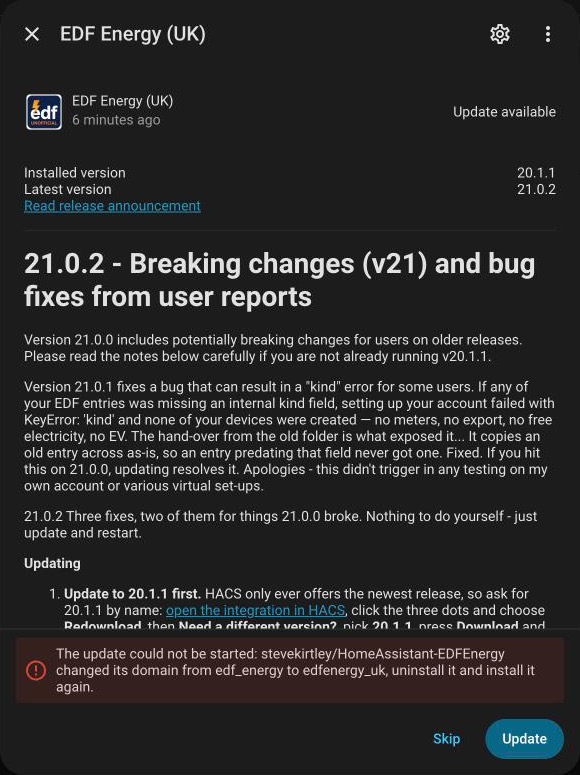
The message suggests uninstalling, but the Marketplace won't uninstall it while it's still set up. Instead it offers to delete your setup for you:
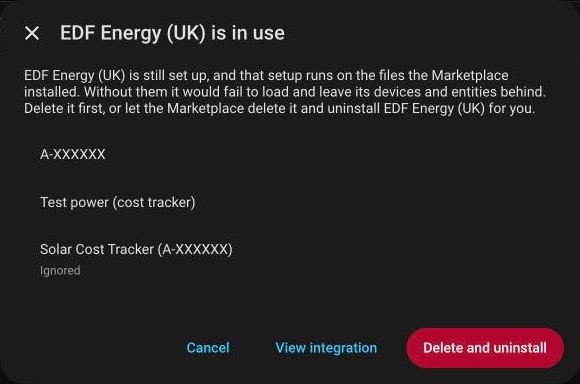
Press Cancel here
Delete and uninstall deletes your account and every cost tracker from Home Assistant, along with their devices, entities and customisations. You'd have to set everything up again, including your EDF password. You don't need it: the steps below get you to the same place with everything intact.
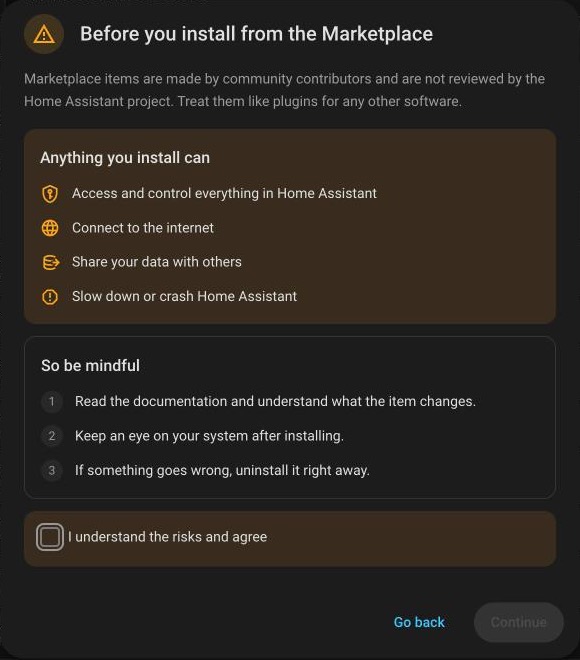
If the Marketplace asks you to read a warning first
The first time you open the Marketplace it shows Before you install from the Marketplace. Tick I understand the risks and agree and press Continue. Until you do, nothing can be updated, installed or uninstalled.
Step 1: get the new folder#
Open the latest release on GitHub, scroll to Assets at the bottom and download Source code (zip).

Unzip it. Inside is a custom_components folder, and inside that is edfenergy_uk.
Step 2: copy it into Home Assistant#
Copy the edfenergy_uk folder into the custom_components folder of your Home Assistant
configuration, using whichever you already have: the File editor, Samba share,
Studio Code Server or SSH add-on. When you're done it should look like this:
config/
└── custom_components/
    ├── edf_energy/        <- the old one, leave it where it is
    └── edfenergy_uk/      <- the one you just copied in
Don't delete edf_energy. It's still running your account, and the Marketplace will remove
it for you in step 5.
Step 3: restart Home Assistant#
Settings > System, then the power button in the top right, then Restart Home Assistant. Everything carries on as before: the old folder is still running your account.
Step 4: take your setup over#
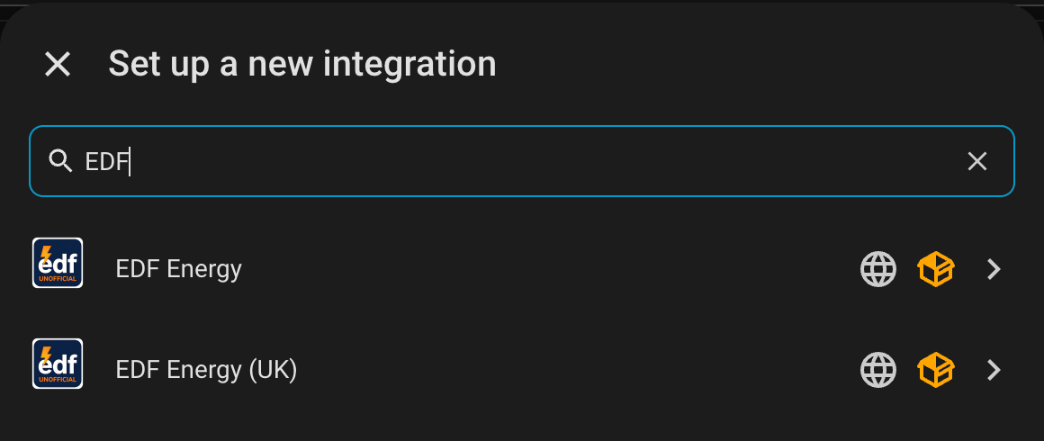
Go to Settings > Devices & services > Add integration and search for EDF. You'll see
both names. Choose EDF Energy (UK):
Instead of asking for your login, it offers to take over the setup you already have:
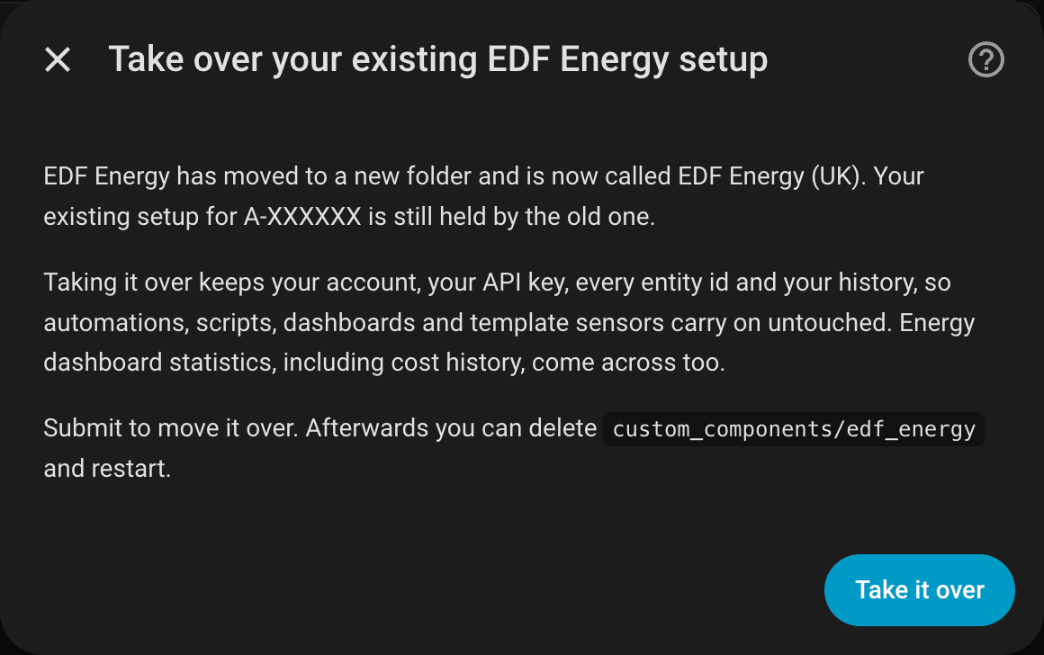
Press Take it over. There's nothing to fill in.
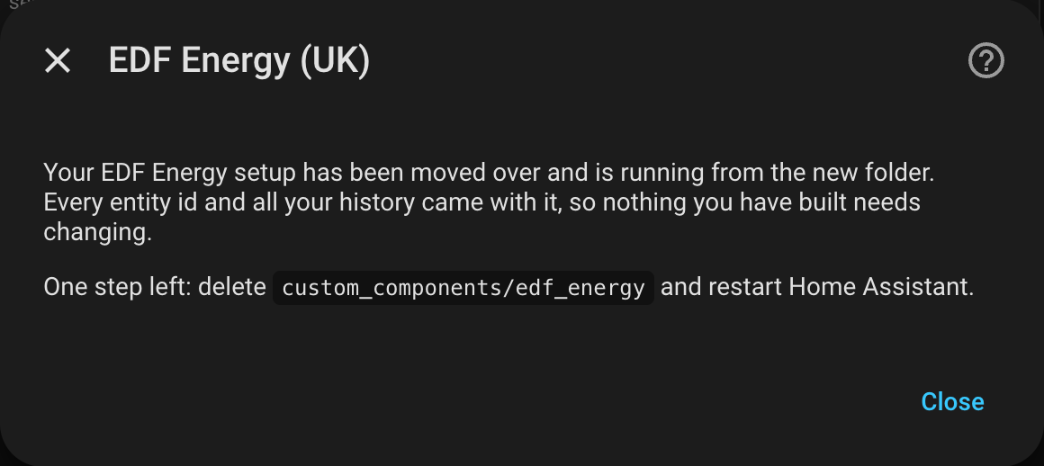
Your account is now running from the new folder. The notice tells you to remove the old
one. With the Marketplace, that's the next step. Don't delete custom_components/edf_energy
by hand: that would leave the Marketplace thinking the old one is still installed.
On 20.1.1 there's a shortcut
If you were on 20.1.1, a notice appears in Settings > Repairs after the restart in step 3. Its Hand it over button does the same as this step.
It needs 21.0.4 or later in the folder you copied in step 2. With 21.0.3 it fails with "The hand-over did not finish", and nothing is changed. Use Add integration as above instead.

Step 5: uninstall the old one in the Marketplace#
Do steps 5 and 6 together, without restarting in between
The Marketplace forgets about an uninstalled custom repository when Home Assistant restarts. If you restart between these two steps, it won't be listed any more, and you'll have to add it back as a custom repository before you can do step 6.
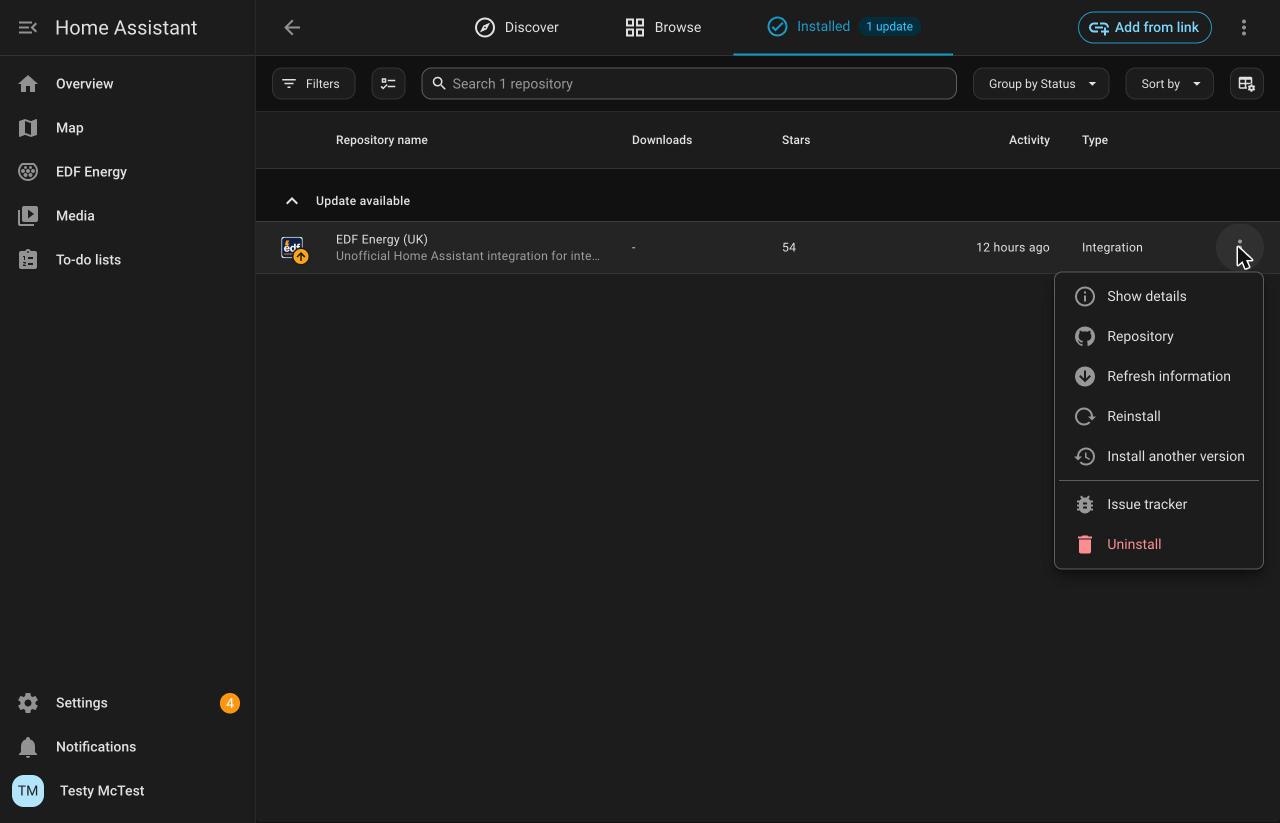
Open the Marketplace and go to Installed. Press the three dots next to EDF Energy (UK) and choose Uninstall:
Why it already says EDF Energy (UK)
The Marketplace lists a repository once, under the name its newest release gives it. So the old 20.x install shows as EDF Energy (UK) here, even though Devices & services still calls the old one EDF Energy. If the Marketplace hasn't been able to check GitHub yet, it may still show EDF Energy. Either way it's the one by stevekirtley, and it's the only EDF entry under Installed.
This time it doesn't say it's in use, because nothing is set up on the old folder any more. It just asks you to confirm:
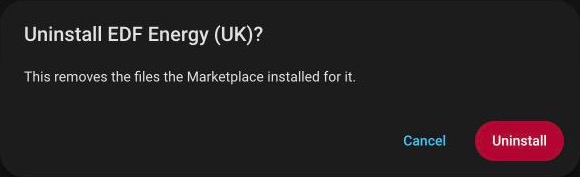
Press Uninstall. This deletes custom_components/edf_energy and nothing else. Your
setup is running from edfenergy_uk, which the Marketplace doesn't know about yet.
Step 6: download it again#
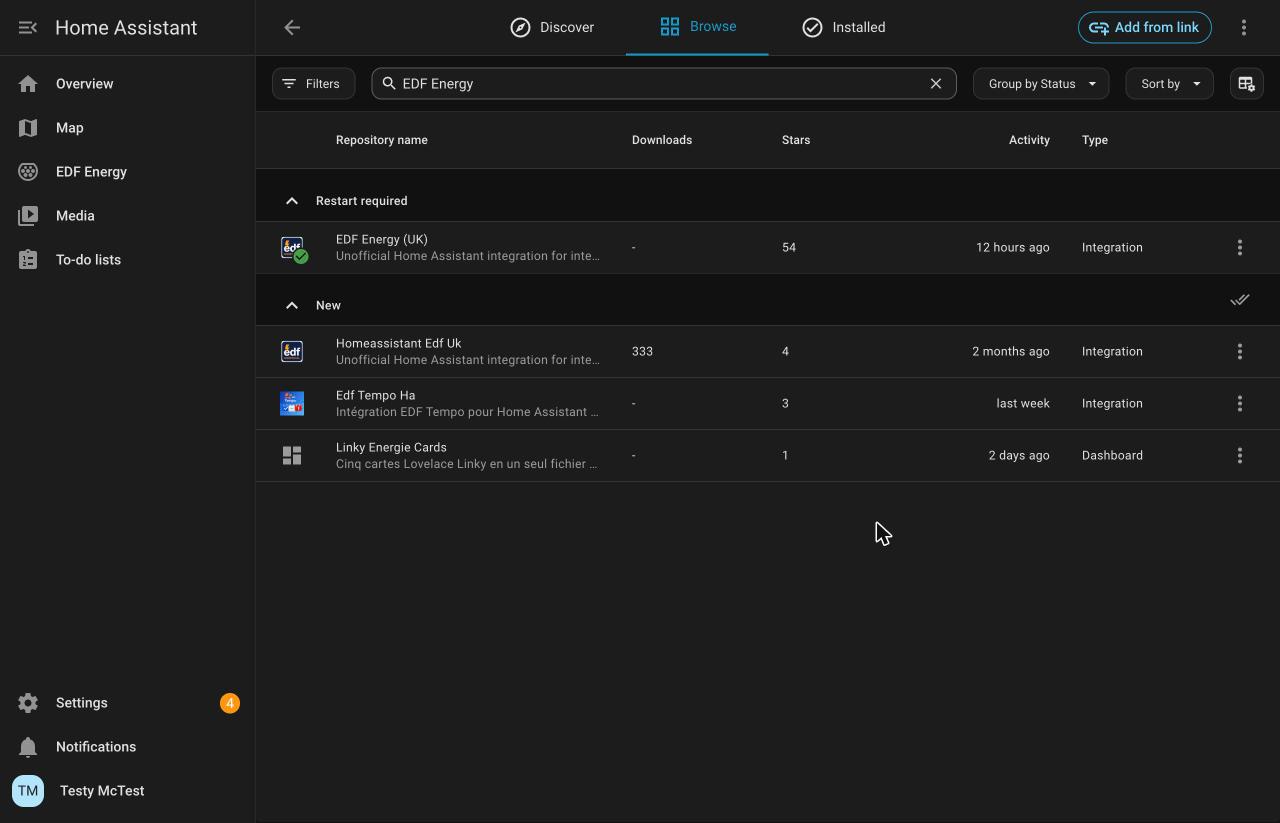
Go to Browse and search for EDF Energy. EDF Energy (UK) is listed under
Available or Restart required:
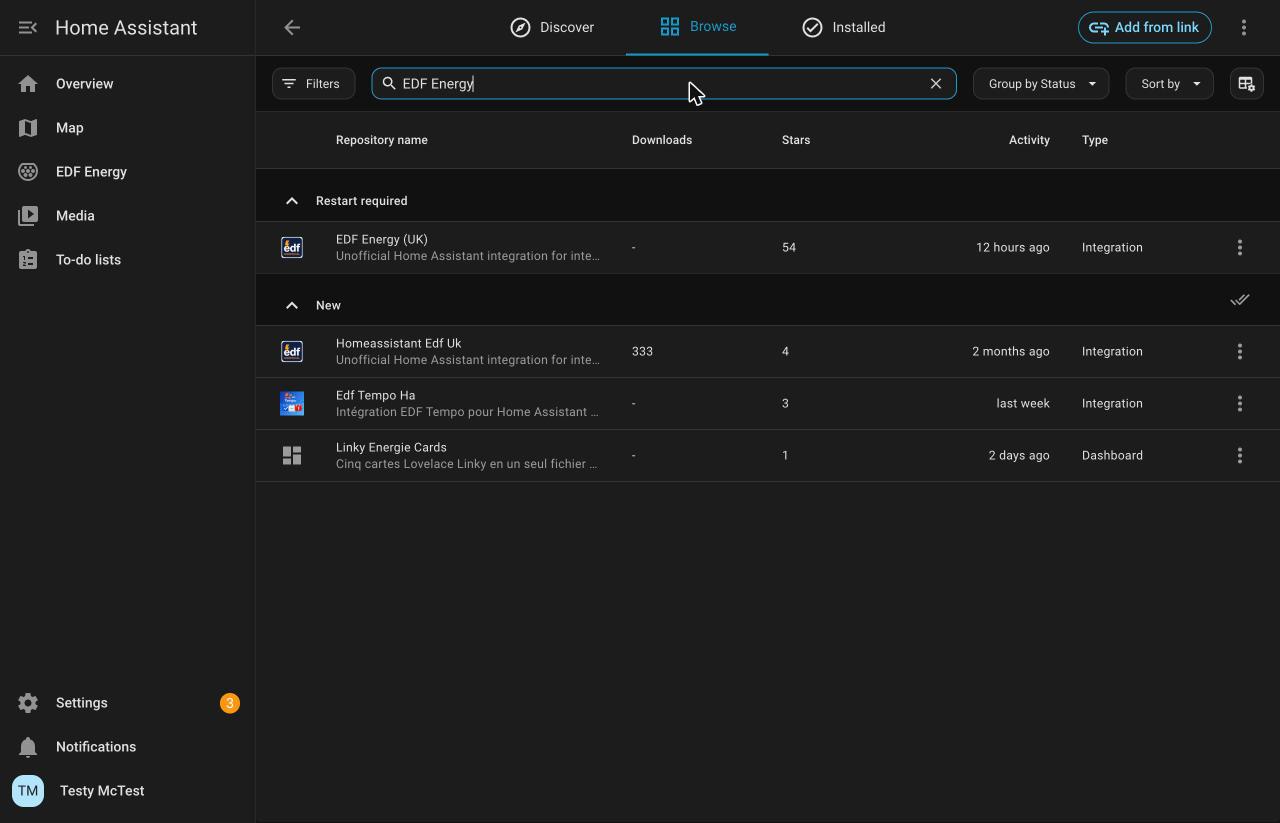
Pick EDF Energy (UK), not Homeassistant Edf Uk
Homeassistant Edf Uk in the same list is a different integration by another
developer. It isn't a newer version of this one, and it installs into the old
edf_energy folder.
Press the three dots next to EDF Energy (UK) and choose Refresh information first. Then open the three dots again and choose Install:
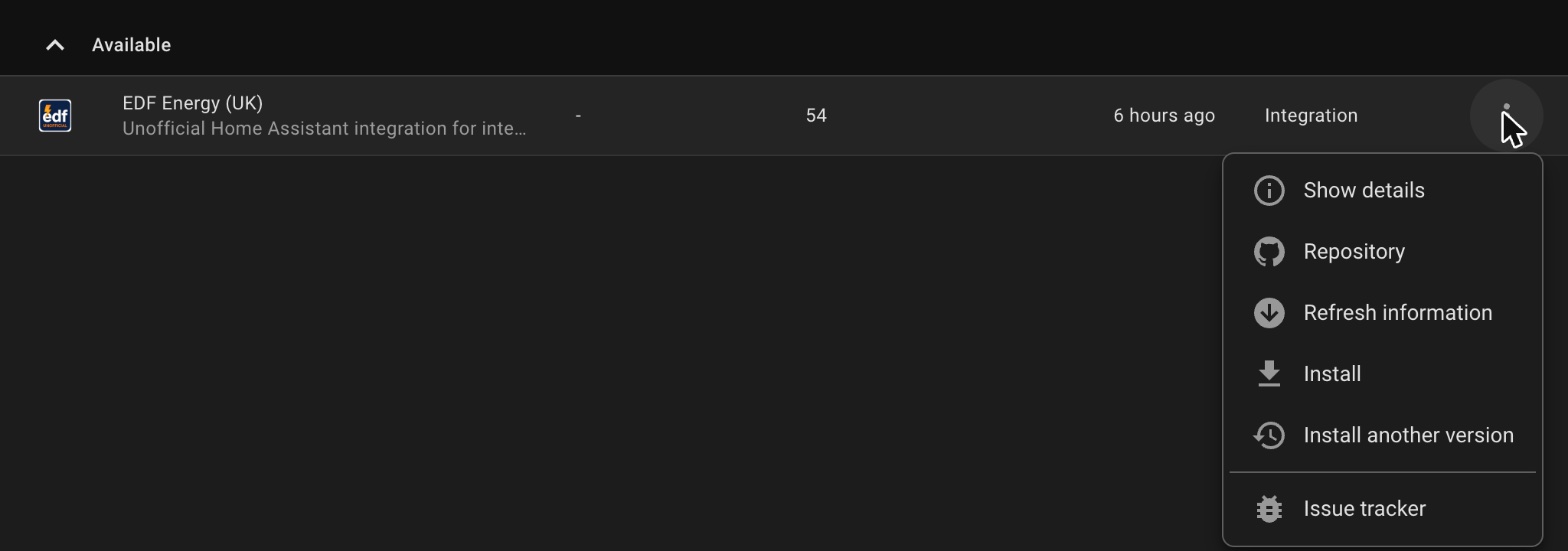
Don't skip Refresh information
The Marketplace still has the old folder name on record. It only checks GitHub again by itself once per session, and if you tried the update first, that check has already been used up. Without a refresh, Install fails with:
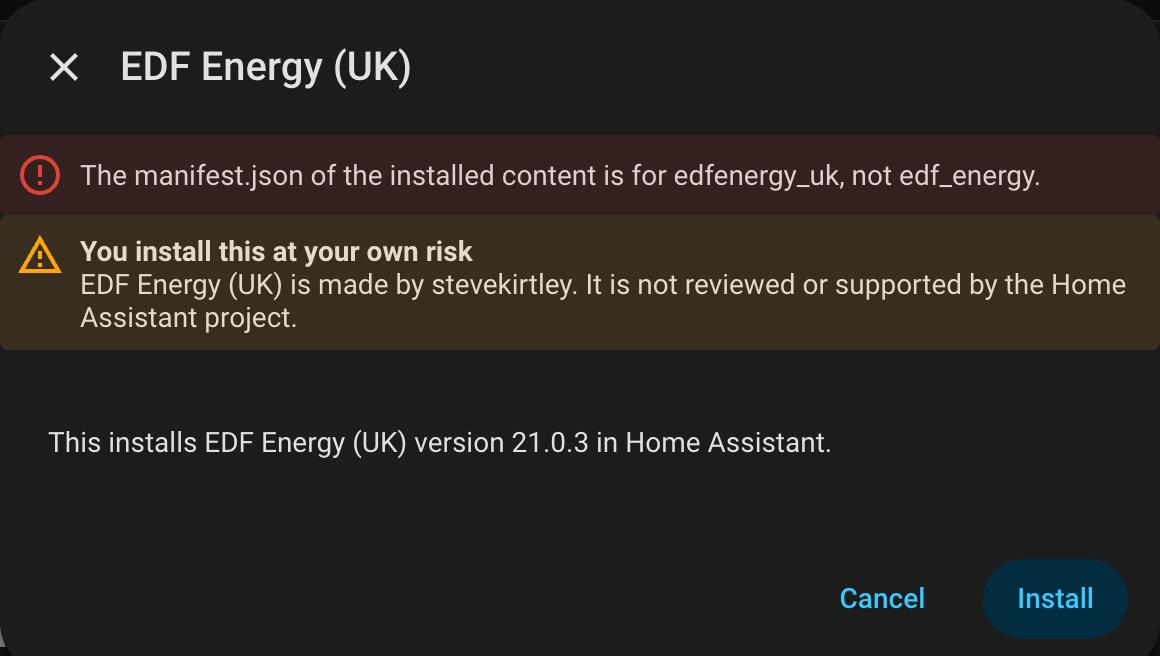
Nothing is lost if you see this. Press Cancel, choose Refresh information, then Install again.
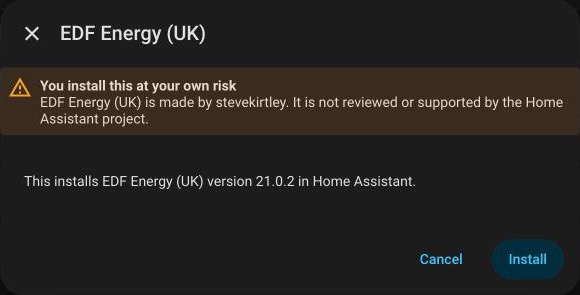
Press Install. It installs into edfenergy_uk, replacing the copy you made in step 2
with the same version, and from now on the Marketplace is managing it again.
Step 7: restart Home Assistant#
Restart once more. The Marketplace now shows EDF Energy (UK) as installed, Settings > System > Updates has nothing waiting, and the notices about the old folder have gone.
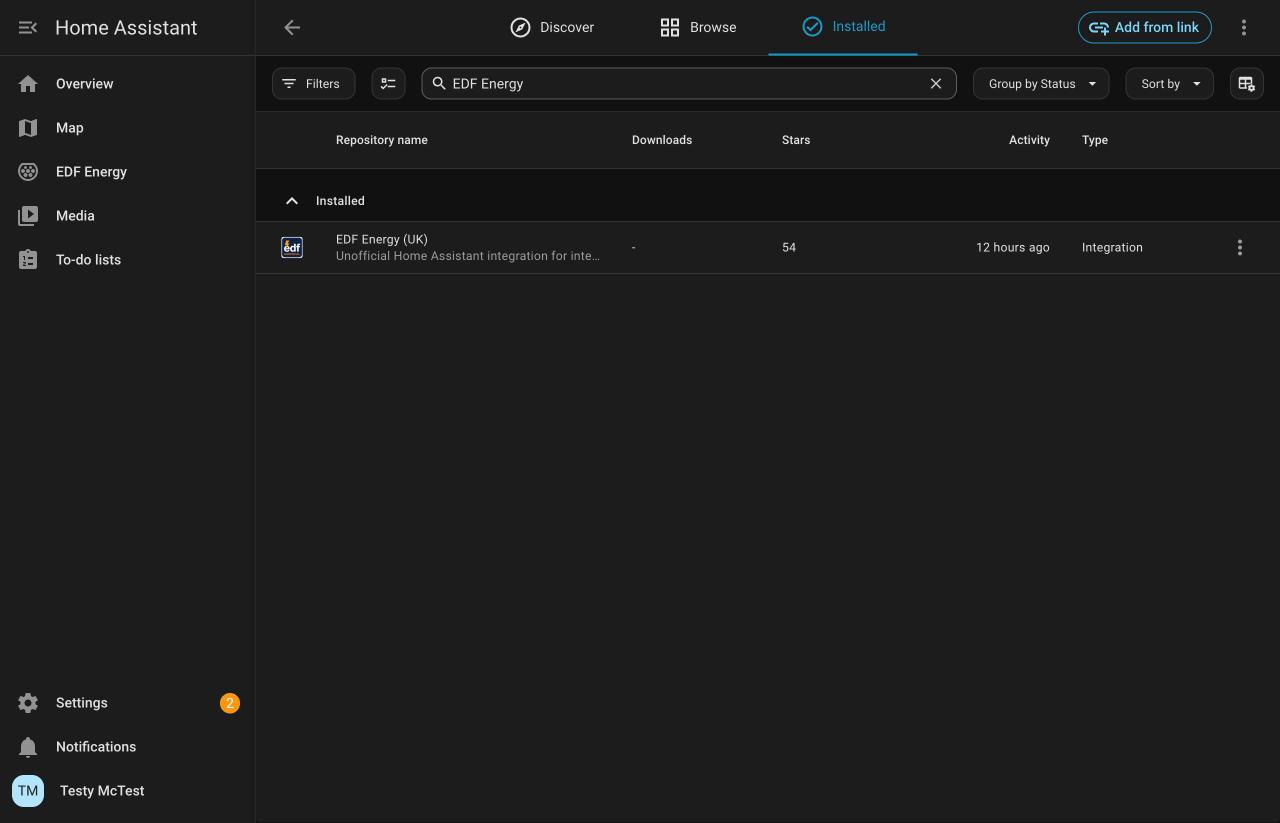
Future updates arrive in Settings > System > Updates like any other.
If you restarted between steps 5 and 6#
Nothing has stopped working, because your account is running from the copy you made in
step 2. But the Marketplace no longer lists the integration, so it won't offer you updates.
To get it back, open the Marketplace, press the three dots in the top right, choose
Custom repositories, add https://github.com/stevekirtley/HomeAssistant-EDFEnergy with
type Integration, and then do step 6.
Adding a custom repository needs a GitHub account connected to the Marketplace. If you came from HACS, yours carried over.
First, check which version you are on#
In HACS, open EDF Energy. The version you have installed is shown at the top of the page.
| You are on | What happens when you update | What you need to do |
|---|---|---|
| 20.1.1 | The integration keeps running and puts a notice in Repairs | One click. Go to Path A |
| 20.1.0 | The integration stops loading and every entity goes unavailable | Update to 20.1.1 first. Go to Path B |
| 20.0.0 or any 19.x | Nothing changes and nothing prompts you | Start the move yourself. Go to Path C |
The short version
Whatever you are on, updating to 20.1.1 and restarting before you take version 21 gives you the easiest path. From 20.1.1 the integration walks you through the rest.
Path A: updating from 20.1.1#
This is the guided path. After HACS downloads version 21 and you restart, the old folder carries on running your account exactly as before — nothing goes unavailable — and a notice appears in Settings > System > Repairs:

Click it, and you get this:
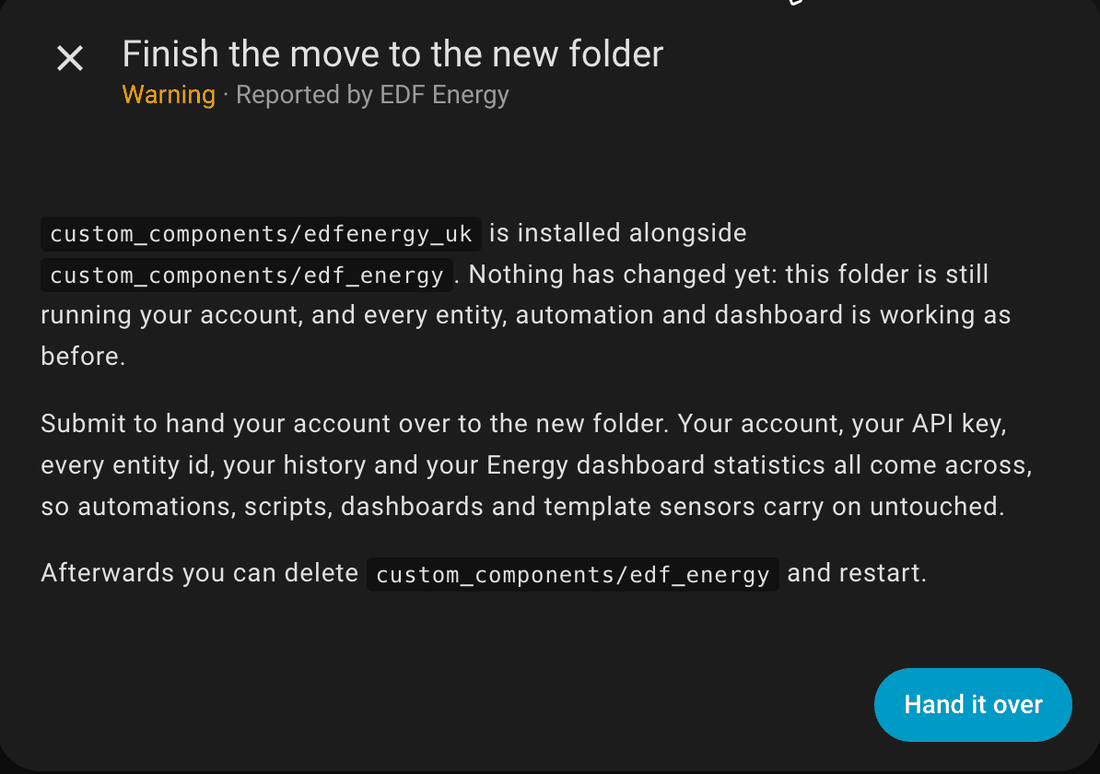
Press Hand it over. That is the whole move — there is nothing to fill in and nothing to reconfigure. Your account is now running from the new folder.
Then follow Afterwards to clear out the old folder.
If the notice does not appear
Restart Home Assistant. A folder HACS has only just downloaded is not picked up until a restart, and the notice is raised when the integration next starts.
Path B: updating from 20.1.0#
Update to 20.1.1 first
Going straight from 20.1.0 to version 21 stops the integration loading. Every entity goes unavailable and stays that way until you finish the move by hand.
In HACS, update to 20.1.1, restart Home Assistant, and then take version 21. You will then be on Path A and get the one-click prompt.
If you have already updated#
Your EDF Energy entry in Settings > Devices & services will be showing an error, and the log will have:
Replaced by edfenergy_uk. Delete custom_components/edf_energy and restart.
There is also a notice in Repairs titled EDF Energy has moved to a new folder.
Do not follow that advice
Both that message and that notice tell you to delete custom_components/edf_energy and
restart. That does not fix it, and if you do it first you are left with your account
attached to a folder that is no longer there, with nothing on screen explaining why.
This was wrong in 20.1.0 and is corrected from 20.1.1 onwards. Use the steps below instead.
To recover, hand the account over from the new integration's own setup screen. These are the same steps as Path C below.
- Go to Settings > Devices & services and press Add integration.
-
Search for
EDF. While both folders are installed you will see an entry for each, and the name is what tells them apart — the new one has (UK) on the end.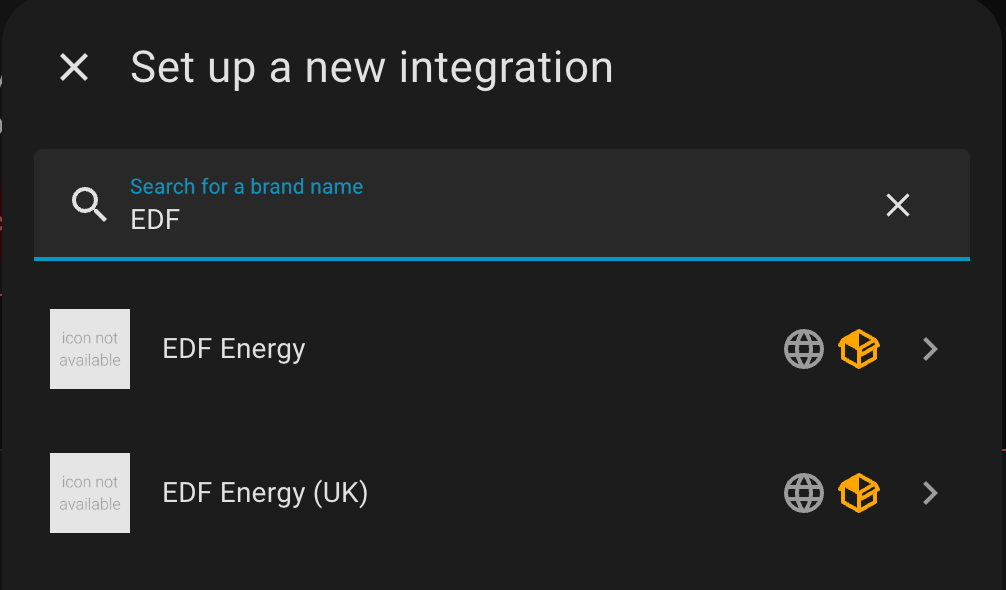
-
Choose EDF Energy (UK). It finds the setup the old folder is holding and offers to take it over:
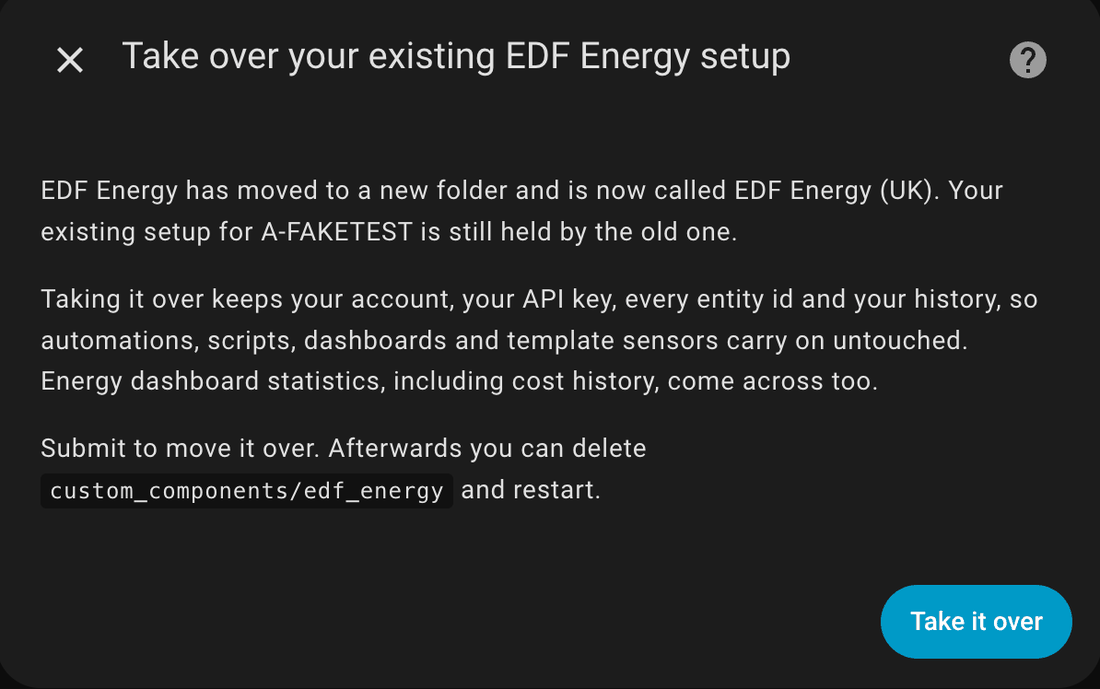
-
Press Take it over. You get a confirmation that the move is done, and your entities come back:
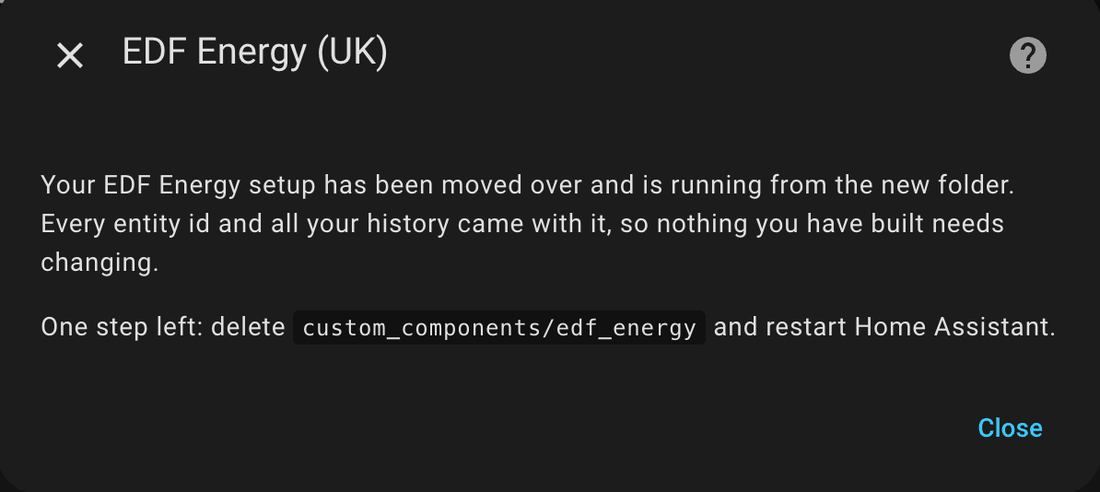
This works whether or not you have already deleted the old folder, so if you followed the wrong advice before reading this, the same steps still put you right.
Then follow Afterwards.
Path C: updating from 20.0.0 or any 19.x#
Nothing will prompt you
These versions know nothing about the new folder. After you update, the old folder simply carries on working — every entity stays available and nothing appears in Repairs — while the new folder sits on disk doing nothing.
It looks like the update worked. It downloaded, but none of version 21 is running, and it will stay that way until you do the step below. HACS will show version 21 as installed, so nothing further will remind you.
The tidiest route is to update to 20.1.1 first and restart, which puts you on Path A and does the rest for you.
If you are already on version 21, start the move yourself using the Add integration steps
shown in Path B above — search for EDF, choose
EDF Energy (UK), and press Take it over.
Then follow Afterwards.
Afterwards: deleting the old folder#
Once your account has moved, the notice from the old folder goes and a new one takes its place:
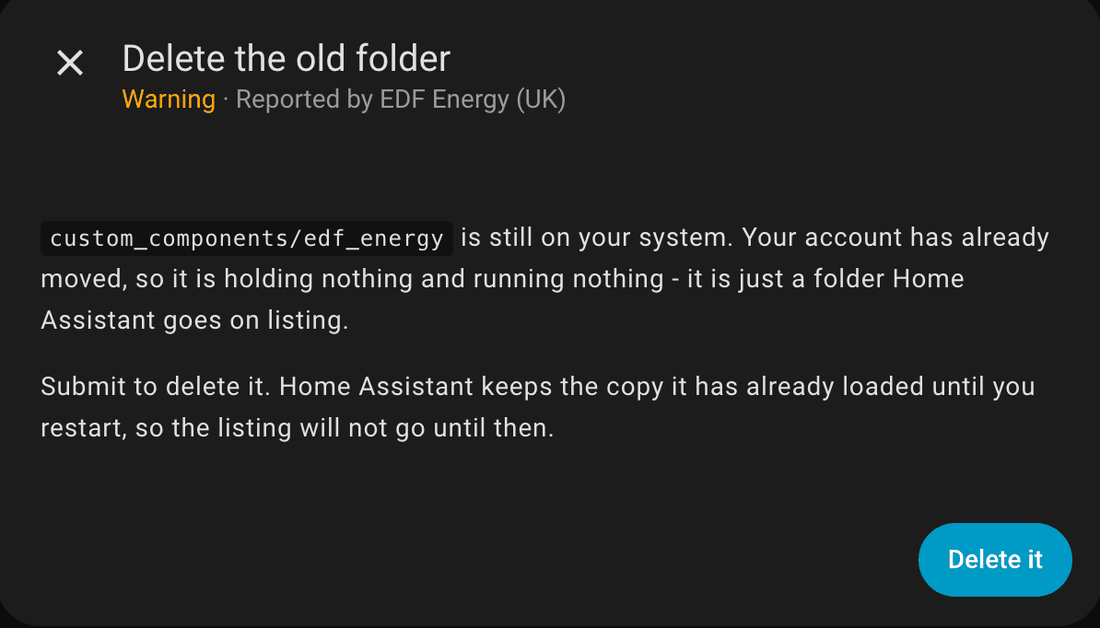
Press Delete it, then restart Home Assistant. Until you restart, Home Assistant carries on listing the copy it had already loaded — that is expected and harmless.
If you would rather do it yourself, delete the custom_components/edf_energy folder and restart.
Leaving it in place does not break anything, but Home Assistant will keep listing it and the
notice will keep coming back.
What carries over#
| Comes across | |
|---|---|
| Account number and API key | Yes |
| Every entity id | Yes, unchanged |
| Entity history | Yes |
| Energy dashboard statistics, including cost history | Yes |
| Automations, scripts, dashboards, template sensors | Keep working untouched |
| Cost tracker and tariff comparison sensors | Yes |
You do not need to re-enter your credentials, and you do not need to edit anything that refers to an EDF Energy entity.
Questions#
Will my automations break?#
No. Entity ids are preserved exactly, so anything that refers to them carries on working.
Do I need my password again?#
No. Your stored API key moves across with the account.
Why has it moved at all?#
The folder name and the listed name both needed to change for the integration to be distinct within HACS. The rename is the whole of it — no features have been removed.
Can I just delete the old folder and let the new one pick things up?#
No. Home Assistant only starts an integration that something already refers to, and until the hand-over has happened nothing refers to the new folder. Deleting the old folder first leaves your account attached to nothing. Always hand it over first, then delete.
I pressed the old EDF Energy in the Add integration list by mistake#
From 20.1.1 that is harmless — the old one stops short and points you at EDF Energy (UK). Nothing can end up set up twice.
Where do I get help?#
See the new folder repair notes, the FAQ, or raise a discussion.